Lodahl's blog: task panel
Showing posts with label task panel. Show all posts

03 June 2013

Exciting new design initiative


Through out the last couple of years we have seem quite a few suggestions to a new and more modern look and feel for LibreOffice. Some of these initiatives has already found its way into the product, and you can e.g., see a much more light weight ruler in Writer and the whole sphere around using and handling templates has been reworked with a new design. Each of these examples are small steps ahead towards a more modern layout. But when will we see something more like a jump into the future?

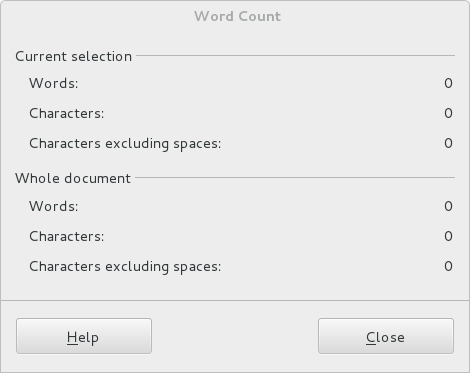
We already got it although you might not actually notice it. More than two hundred dialogues has been recomposed with a completely new development method. This work has a big strategic importance for the community, because in addition to improving the appearance of the UI right now, it opens a lot of long term opportunities.

An example is the word count dialogue. This is how the old method looked:

And with the new WidgetLayout method:
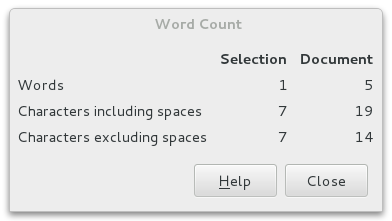
You can read more about this new Widget Layout here: https://wiki.documentfoundation.org/Development/WidgetLayout .

But soon you will see some eye candy too.

Experiments are going on to take advantage of the fact that more and more screens are 16:9 format and not as earlier in 4:3 format. This development is resulting in wider screens both on laptops but also when using traditional desktop computers. This challenges the planning of the application wire frame. The trend goes towards vertical panels or tool bars that takes advantage of the wider screens. This is in contradiction to the Microsoft approach that implements his ribbons under the ceiling taking up space where there is no space.
Illustrating the proportions

I will emphasize that this is a suggestion and not yet a decision and the final implementation will probably take some time.

An example of how the context sensible tools can appear to the right.

Sidebar in Writer
Please notice that these screen shots are not only mock-ups but actual screen shots from a running version on Windows. Please note that this is a very early and absolutely not stable version.

More screen shot below in this article.

The idea is a panel in the right (or left) side of the screen with a bunch of tools. Some tools are static e.g., the Navigator and the Gallery and some others are context sensitive and changes its content from what your cursor is selecting. This is the case with the the properties tool.

You can select between the various tools with the small icons most right. The plan is that these tools will replace some of the traditional toolbars in the top of the screen. Then we take really advantage of the wide screen.

Last but not least it seems that its possible to develop and install extensions that enhance the functionality also in the panel. I have installed two extensions that uses the task pane in earlier versions of LibreOffice and they automatically show up in the icon bar but the extensions doesn't show up in the pane yet. But it really looks good.

The background for this experiment is actually a result of IBM donating Lotus Symphony to Apache Open Office. The donation is licensed in such way that the functionalities can be ported to LibreOffice.

As mentioned earlier this feature is absolutely in a very early stage and it needs a lot of fine tuning to be ready for production. First of all the original code was developed back in 2008 and has not been maintained since. Also it takes quite a lot of effort to make it fit into the LibreOffice code base in a proper and safe way.

More screen shots:
Navigator in the Sidebar

Sidebar in Calc
Gallery in Calc

11 February 2013

[UPDATED]OpenClipart - Part II

Some time ago I wrote about our plans to intergrate OpenClipart.org API in LibreOffice. You can read that post here: http://lodahl.blogspot.dk/2013/01/libreoffice-and-openclipartorg.html .

And thanks for all the good advice on the comments list. All input will be read and taken seriously.

Now I want to tell you how far we are...

First of all we decided to go with LibreOffice 4.0 because the embedded Python runtime environment has been upgraded. We didn't want to go with yesterdays technology.

We developed a Python routine that draws the dialog and searches through the API. We get the result back and present titel and thumb nail image in the dialog. When clicking on a thumbnail image the SVG-file will be inserted into the document at the cursor position. Some meta data from OpenClipart.org is added to the inserted image.

It actually works :-)

You can find a very unofficial extension here. Do NOT try to install this extension in other thann LibreOffice 4.0.

The core insert of the image is actually done by a Basic macro as this is the most easy way to do that. We decided to use the dispatcher for it.

Well we still have a lot of work to do. First of all error handling and we must find some way to disable the dialog while we get data over the internet. Otherwise we get an error from Python even if we just touch the dialog - because the dialog is not ready yet.

We also need to be able to control the size of the inserted image. So far we just use 100% page width witch is probably not what we should do. We are still working on that.

Next is to put the dialog into the task panel as I mentioned in my earlier post. Perhaps we should just try to make dockable window instead but we will see to that. Does any of you guys know how to?

We tried to create an extension so that you guys can try it out but that failed. Something is wrong and it seems that LibreOffice 4.0.0.3 is a little buggy. In the daily built it actually installs but it doesn't run. It claims that Python is not a supported scripting language. (reported as a bug already as https://bugs.freedesktop.org/show_bug.cgi?id=60694 ). You can pick up the extension from there if you like. It doesn't work but it can be installed manually (Python and Basic ...copy and paste you know). As soon as we know whats going on I'll be back. I want to get it out to you as soon as possible so you can try it out.

Here is a short video for demonstration:


By the way we discovered another but (as reported here: https://bugs.freedesktop.org/show_bug.cgi?id=60692 ). It seems that LibreOffice 4.0 extension manager doesn't recognize its own version number. Its simply not possible to install an extension that depends on 4.0. But thats another bug.

09 April 2012

The task panel in LibreOffice

LibreOffice has a very little known feature called the task pane. You might already be familiar with the navigator and the Styles and formatting dialogues. These dialogues are dockable whitch means that you can glue the dialogues to the border of the LibreOffice window.

It is however possible to create your own dockable dialogues. The dialogue becomes dockable through the so called task panel.

The task panel is only visible when you actively choose to show it and besides that you can only show it if it has content. In the view menu you might find the menu item “Task panel”. But as mentioned its only present in the menu if the task panel has an active content. When its visible it can be docked to one of the sides of the window or it can be floating. You can move it around and put it where you find it best for you.

In my case I have transformed an existing extension – the “Lorem Ipsum Generator” to show up in the task panel. As the task panel has a very little prominent occurrence in LibreOffice I decided to keep the Lorem Ipsum icon in the tool bar but now it only toggles the task panel on and off.

The result is that the tool becomes available at all times. Not open and close the dialogue any more. Just put the cursor wherever you want some dummy text and click the button in the task panel.

Usability

In the discussion about usability and “the new GUI” I think this could be the beginning. Of course the whole concept must have an overhaul as there are still some problems. First of all I don't think it's possible to use a localizable dialogue in the task panel. Therefore I had to keep the dialoque in English only but I hope that this will be only for a short time until I find out how to localize it. Another problem is that its not a trivial task to transform a dialogue into a a task panel item. I don't even think its possible to do with basic alone. i think it should be possible to generate an extension with dockable dialogues as its possible to generate extensions with the extension packager.

Anyway. I believe that the task panel could easily become a very important step into a new GUI. Not alone but followed by other efforts. Also we need to discuss if some of the existing built in dialogues in LibreOffice could easily be transformed into dockable tools. One thing I personally would like to see is the word count dialogue made dockable. Since 3.5 this dialogue has been modal witch means that it can be open while you type. It would be an obvious decision to put that dialogue in the dock.

What do you think? Would it be a good idea to continue to work on the task panel idea?

If you want to try my extension you can find it here: http://dl.dropbox.com/u/9348527/LoremIpsum.oxt but please have in mind that its not yet completely finished.