This article is an addition to my speak at the LibreOffice Conference in Aarhus. You can find the introduction here: http://conference.libreoffice.org/2015/the-program/talks/migration-user-experiance-and-marketing/#Templates%20-%20Avoid%20the%20pitfalls The presentation and video of the presentation will be available as soon as possible.
Introduction to templates
If you provide your users with good and solid templates they will not only create consistent and beautiful documents. The documents will also be good and solid. One example is that if you produce your templates with care, you can actually make them more interoperable with Microsoft Office. If you know that interoperability is an issue you should avoid specific features that is known to have problems when converting the document to Microsoft Office formats.Working with templates sounds pretty straight forward if you read the manual. But when it comes to the real world the story might turn a bit on the way to the final result.
I have written about how to develop good and solid templates here: http://lodahl.blogspot.dk/2014/12/making-good-and-solid-templates.html and there is an article about styles here: http://lodahl.blogspot.dk/2015/09/something-about-styles.html.
But when you are done with the development you need to deploy the templates in a safe way.
Deployment
Templates can be deployed in many different ways and what method you should choose depends very much of the circumstances. If you have a lot of different templates that are to be used bu different people in different departments then you have one situation. But if you only have a few standard letters that is to be used by everybody in the company then its another situation. You also need to take into account how often you expect to update the templates and perhaps deploy new ones.Methods for deployment:
- Import templates in LibreOffice
- Store templates in the users template directory
- Store templates in the program directory
- Deploy templates via an extension
- Register a personal folder as template directory
- Register a file share as template directory
Import templates in LibreOffice
Importing templates manually is not suitable as this requires manual work.Store templates in the users template directory
You can deploy templates simply by copying the ott-files into the user directory /user/template/...This path is also the default place to put imported template files.
Store templates in the program directory
You can of cause store the templates files directly into the program path (/share/template/common/...) as mentioned above, but this is not the recommended way.
Deploy templates via an extension
Its rather easy to wrap up you templates in a nice extension and submit that to your users. By using an extension for handling the templates you are able to keep track of version and variations. But if you expect to make regular updates or even deploy more templates in the future, the packaging procedure is on the other hand a little time consuming.You can find the details about making extension packages here: https://wiki.openoffice.org/wiki/Non-code_extensions#Templates_Extensions
Register a personal folder as template directory
This method is most likely one of the most commonly used methods. You need to create a folder somewhere on each local computer under the users personal directory. Then you register that location as a new template location. You can do that manually in Tools - Settings - Paths. Select the Templates type and click Edit.
Please note that in this case I have four places for templates and that one of them is the default (with the radio button ticked) and this is where imported templates are copied to.
This setting can be granted all your users easily with an extension that contains a single instruction about this path. It consist of an XML-file with the following content:

You can use variables like $(user) for the users local settings, $(insturl) for the installation path or $(work) for My Documents in Windows environment. You can find them all here: http://api.libreoffice.org/docs/idl/ref/servicecom_1_1sun_1_1star_1_1util_1_1PathSubstitution.html
Details about how to make it into an extension is here: https://wiki.openoffice.org/wiki/Non-code_extensions#Path_Settings
You can also add this path setting using Windows Registry and this can be managed through one or more Group Policies in the Active Directory or similar administration system. You can read more about that on my blog here: http://lodahl.blogspot.dk/2014/10/managing-settings-on-windows.html
After implementing the extension all you need to do is drop the template files into this folder on each computer. The advantage is that the templates are always available but the disadvantage is that you need to drop files on each computer.
Be careful though not to add too many paths as template paths. Multiple paths will slow down LibreOffice in starting up. This is primarily the case if the paths are network drives but also multiple paths on you local machine will slow LibreOffice.
Deploying templates via shared server
If you have a lot of templates and you expect to make multiple new deployments and edits in the future and if you need to deploy different template to different users in different departments you might want to use a shared file server for the purpose. You can create a folder for each department and simply dump the template files into each department folder. Access to the templates can be administrated through the access to each department folder and this is most likely the most common way to deploy multiple templates as its rather simple to administrate when first setup. But be aware that this method over time can lead to conflicts if you use multiple templates with the same name. Also there is a risk that people with access to multiple department folders (e.g., the IT-department) ends up having problems loading any of the templates. The amount of templates simply overloads LibreOffice attempting to generate the template overview.The advantage of using a shared server is that its very easy for you to maintain the content. If you need to deploy a new template or change the content of another, you can simply just drop a new file on the server and it will be available for all users immediately.
It IS possible to register an URL as template path (HTTP-address) but personally I couldn't make it work most likely because of network latency. LibreOffice becomes very slow when trying to generate the template overview, and in some cases no templates where shown at all.
Conclusion
The method to use depends very much on the circumstances. if you have many templates and you expect to maintain them regularly in the future, then the recommended way will be to deploy the templates on a shared file server and add the path to the templates with an extension.Further ideas
To avoid network latency its possible to put templates on an ownCloud server and sync the files to each computer. The folder where ownCloud syncs can then be registered as template folder. That way you can distribute templates without thinking of network latency.Further topics
Now I will point out some technical details that are very important to know before you begin.Remove unused pre-installed templates
LibreOffice comes with some pre-installed templates ands some of them are in English. A resume with English text and even pre-filled names are not suitable for a business environment and you might want to remove them in the first place. The templates are located in the program directory in the path /share/template/common/... but you should have in mind that some of the Impress templates and layouts are suitable to leave as they are.Naming templates
Each template has a name. The name is what you see below the preview in the templates overview. The template name is given in the template file under File - Properties - Description tab in the Title field. Be careful about naming your templates. If you have multiple templates with the same name then you will only find one of them in the templates overview and in the menu "New document from template". If you have a template in your environment but can't find it in the templates overview then its most likely because another template exist with the same name. And you have no tools to identify the problem.Be aware that when you create a new template from another template then the new template will automatically inherit the name from the original template. This is very unfortunate as this results by default in a conflict. The second template (or the original) will vanish from the templates overview.
Organizing templates in folders
If you identify a path as your template folder, that path will be registered and any template file in the folder will be visible for the user in "Templates" from the Start Center. But if you create sub-folders in the template folder these folders will be visible as separate folders along with My templates and NOT within My templates. Please not that you can NOT establish cascading folders with multiple levels. All you can do is to choose not to put templates in My templates but in a separate folder.
Its unclear when a new template in a custom path actually turns up in the templates overview. Sometimes it requires a restart of LibreOffice and sometimes even a restart of the computer. Also the overview of templates doesn't seem to be in sync with the Edit template overview.
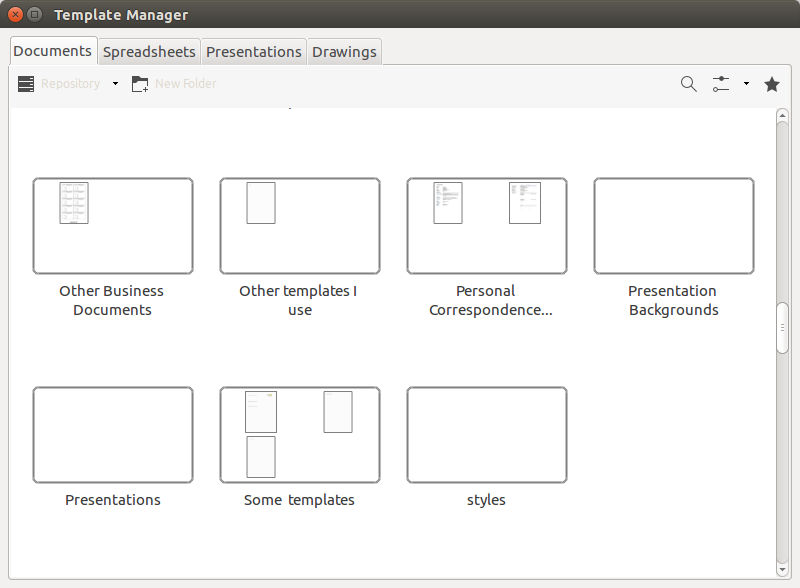
It is possible to put a link in a template folder that refers to a template somewhere else. This means that you can put templates in one place (e.g., on a server) and put links or references to these templates where the templates belongs (e.g., on the local machine).
Inherit styles from the template
Documents can inherit styles from their template. When you create a new document from a template, that document is still connected to the original template. In case you open the document at a later time, and the template has changes to its styles in the meantime, then you will be asked if the document should inherit the changes (update styles from the template) or not.
This is very useful also because one template can inherit from another template.
Unfortunately its not logical LibreOffice determines what template to inherit form. It seems to be based on the path- and file name alone and NOT with the name. Therefor its very important not to change file name or move any templates after deployment.
The meta data in the ODT-file looks like this:

When it comes to inheriting styles from one template to another I prefer NOT to inherit automatically as I don't find it reliable. in stead I load styles manually with Load styles. Although this dialog has a pretty annoying behavior.







 Del.icio.us
