Today Monday will be the day of OpenOffice.org 3.1.1. This is a bug-fix version and there are no actual new features this time.
Be aware of fraud websites that are offering OpenOffice.org for money. In best case you will be paying for something that is actually free - or worse - you (sorry, your computer) will get infected by virus or trojans.
OpenOffice.org is free. You can download it from www.openoffice.org or da.openoffice.org (danish version). You are asked to register as you have installed the product but OpenOffice will work no matter if you register or not.
Enjoy.
Showing posts with label OpenOffice. Show all posts
Showing posts with label OpenOffice. Show all posts
30 August 2009
OpenOffice 3.1.1 released


27 February 2009
Danish OpenOffice.org newsletter
Danish OpenOffice.org newsletter is out: http://doc.oooforum.dk/Nyhed/2009Marts.pdf
06 December 2007
Lotus Notes to OpenOffice,.org integration
I was trying to help my Norwegian colleges find out why our Lotus Notes to OpenOffice.org integration didn't work properly. I have used several hours figuring out what the problem was.
Of cause field mapping must be accurate and in this case it's also case sensitive. And of cause: all required data must be available in the Notes-document.
Hokus pokus. It works.
Here is a movie that shows how it works
28 November 2007
Whats up duck ?
I haven't been blogging that much lately. Sorry, but I feel rather busy at the moment.
- Busy trying to catch up with all the information floating around, both in the community but also regarding ODF and in the NOOOXML world.
- I have spent the last couple of days on a small travel to Aarhus ( http://www.findvej.dk/,8000 ). You know, I also need bread on the table ;-)
- Translation of 2.4 is going slowly forward. But we are still missing several hundred strings.
- Also preparing the next (December) edition of the Danish newsletter (expected to be out one of the first days in December). Sign up for it here: http://da.openoffice.org/servlets/SummarizeList?listName=nyhedsbrev (if you understand Danish)
- I am also trying to contribute to the new certification project and today I have submitted my comments to the Spanish syllabus (http://wiki.services.openoffice.org/wiki/OOo_Certification_Syllabus). Please join the project here if you think you can contribute in any way. Sign up here: http://documentation.openoffice.org/servlets/SummarizeList?listName=certification
- And then I have been trying to plan how to approach the new Parliament after the election this month. Hmmm. I think we have to act on this very soon. I better get on with it, eh ?
- I promised my family to be present once in a while. On Saturday I think we will all go to the movie theater together. Perhaps I should ask my wife out for dinner too. Yes, this is a high priority task on the list :-)
10 October 2007
Thats a challenge
Once in a while I see some challenging questions on the Danish support site http://www.oooforum.dk . Today I found a question about outline numbering. The question came from a couple of guys from University of Southern Denmark (http://www.sdu.dk/?sc_lang=en). The university is using OpenOffice.org and these two are doing an assignment.
They need to make a TOC like this:
Header
1. First chapter
1.1 First issue in first chapter
1.2 Second issue in first chapter
2. Second chapter
2.1 First issue in second chapter
Another header
3. Third chapter
3.1 ...
3.2 ...
etc.
Please note that they want to continue the numbering of chapters, even if there is a header in between. The problem is, that the normal behavior would be like this:
Header
1. First chapter
1.1 First issue in first chapter
1.2 Second issue in first chapter
2. Second chapter
2.1 First issue in second chapter
Another header
1. Third chapter
1.1 ...
1.2 ...
etc.
The outline numbering will reset after the heading entry.
The difficult part is, that the document actually contains four numbered levels of headings 8+ the top level). But only two numbered levels is to shown in the TOC.
Hmmm.....
Normally this would be accomplished this way:
Header <- Heading 1
1. First chapter <- Heading 2
1.1 First issue in first chapter <- Heading 3
1.2 Second issue in first chapter <- Heading 3
2. Second chapter <- Heading 2
2.1 First issue in second chapter <- Heading 3
Another header <- Heading 1
1. Third chapter <- Heading 2
1.1 ... <- Heading 2
1.2 ... <- Heading 2
etc.
But the problem is, that the outline numbering always starts from the top. So what we did was this
Header <- Heading 3The header styles and TOC styles was changed, so it looks as if Header is higher level that Chapter and issue. The TOC is evaluating untill third level and the two first levels are numbered.
1. First chapter <-Heading 1
1.1 First issue in first chapter <- Heading 2
1.2 Second issue in first chapter <- Heading 2
2. Second chapter <- Heading 1
2.1 First issue in second chapter <- Heading 2
Another header <- Heading 3
3. Third chapter <-Heading 1
3.1 ... <- Heading 2
3.2 ... <- Heading 2
etc.
Done.
09 October 2007
Reading ODF files
If you want to read ODF files, you can use OpenOffice.org for that purpose. If you are using OpenOffice.org you can even read files directly in your browser. Read this article:
OpenOffice.org documents within Firefox
(http://mozillalinks.org/wp/2007/09/openofficeorg-documents-within-firefox/)
By Percy Cabello, Posted on September 23, 2007
If you don't have OpenOffice.org installed already, you can download it here for free http://download.openoffice.org
But even if you don't want to install OpenOffice.org you can read ODF files without any problems. It's just a plug-in for your Firefox browser. Read this article:
View open document text files with Firefox
(http://mozillalinks.org/wp/2007/02/view-open-document-text-files-with-firefox/)
By Percy Cabello, Posted on February 15, 2007
You can also download an ODF viewer from this place:
http://opendocumentfellowship.org/odfviewer . But why not install OpenOffice.org in stead ?
08 October 2007
How to put a watermark text on your documents
I know at least three ways you can put a watermark text in your documents:
- Background image
- Drawing text
- Insert Fontwork
1) Background image
Select your page style in the style navigator. Right click and choose Modify.
Select the Background tab and select Graphics in the first field.
Now you can select an image file from your system.
You can either stretch the image or place it on a specific position.
2) Drawing text
From the Toolbar Drawing, select the tool Text.
Draw a box with you mouse and type the text in the box
If you want to see the background text on all pages, you can draw the box in the page header or footer
Mark the text in the box and format it as you need (text size, font, color etc.)
If you mark the text, you can use the rotate tool to rotate the text (grab the corners with your mouse and drag)
Mark the text box and right click. Select Arrange. Select In background
3) Fontwork
Click once in the page header og footer
Click Fontwork Gallery and select a Fontwork style
Type the text you want to appear in the background
Select the inserted Fontwork, right click and select Wrap - In background
Conclusion
Each of the above methods has advantages and disadvantages. Choose from your needs in the individual case. There might even be other methods to achieve the same or better results.
07 October 2007
Search the Internet form OpenOffice.org
Very often when you are working with text documents in Writer, you need to do some research or look up a word on the Internet while you are writing. You can actually look up words on the Internet directly from OpenOffice.org bur very few people has yet discovered this handsome feature in the application.
Some general search sites are predefined in OpenOffice.org, e.g. AltaVista, Gogle and Yahoo, but you can also define your own searches. I often use the Mariam-Webster on-line dictionary to look up English words.
How to define a new search
First you have to find out how the search site parses the search string in the URL address. Try to make a simple search on the search site and the take a look at the URL address when you see the result. On Mariam-Webster it looks like this:
The word I was looking up here was 'accent'.
Now copy the URL string and open OpenOffice.org Writer
Select Tools – Options – Internet – Search
Create a new search and paste the URL from the clipboard into the 'prefix' field.
Select 'Or' and do the same again
Select 'Exact' and do the same again.

Close the Options dialog.
How to search from OpenOffice.org
If the toolbar “Hyperlink bar” is not visible in OpenOffice.org you should make it visible by selecting View – Toolbars and then select “Hyperlink bar”.
Now you are ready to look up any word from your document. Select a word in the text and you will see that the word is now automatically filled in the first field on the Hyperlink bar.
 Now you just need to click the search icon and select the search site you want to use. In this case I select M-W and my browser will immediately show me the search result.
Conclusion
OpenOffice.org has lots and lots of secret features and this is one of them. Very few people will discover all features, but if you try to have a look around the application you will find lots of them.
I can recommend Solveig Hauglands blog. She has made a lot of small tricks and how-tos.
03 October 2007
Extending OpenOffice.org
Sorry, I have been away from my blog for a few days.
This summer I wrote a Danish manual about extensions and how to create and maintain extensions( http://doc.oooforum.dk/Extensions.pdf ). When I wrote the manual, I used both the wiki on http://www.OpenOffice.org : http://wiki.services.openoffice.org/wiki/Extensions . I also used two articles by Dimitri Popov (http://www.linuxjournal.com/article/7802 and http://www.linuxjournal.com/article/9412).
Dimitri is using an example in his article, where he is creating dummy text with Lorem Ipsum. I remember, that it was annoying that the example was masde as a mock up as example and didn't actually create Lorem Ipsum text. I know that this was not the purpose of the article, but I was still thinking: "Why not do it ?".
I have never made a macro in OpenOffice.org before, so I took this as a challenge. I had to find out everything from the beginning and I has some difficulties extracting data from the XML stream. The solution is a little clumsy, I will admit that. If any of you know a better and more elegant way, please feel free to make a new macro.
There is still a few other issues , but I expect to get them solved over the next few weeks.
I have uploaded the solution as extension to the repository, but it's actually not published yet. You can find the odt-file here: http://extensions.services.openoffice.org/download/288
When you have installed the extension, you will see a new tool bar with a button. This button will call http://www.lipsum.com/ give you some dummy text. Not rocket science, but anyway a helpfull feature.
Thanks to DannyB for this description of how to parse an XML stream http://www.oooforum.org/forum/viewtopic.phtml?t=4907 and to Andrew Pitonyak for his dokumentation "Useful Macro Information".
24 September 2007
Summary from OOoCon2007 in Barcelona (I)
The conference in general
I participated in the conference on behalf of the Danish OpenOffice.org community http://da.openffice.org and my journey was sponsored by
Sun
Symfoni Software Denmark
DOSS
I was invited to the conference to speak about the political process in Denmark regarding the Parliament resolution B103 and the implementation of the resolution.
The conference was held at the Barcelona University right in the middle of Barcelona. It couldn't be more central and the University gave us a perfect frame for both formal and unformal meetings. The conference was arranged by the Catalonian language project and SoftCatala http://www.softcatala.org .
The conference program was very tight and it was impossible to find the time for everything. Four tracks of presentations all day long. The most important thing for me was actually to meet all the people that I only knew from emails and blogposts. To meet these people face to face was very important and I got an impression of how huge and complex the organization behind an open source project like OpenOffice.org is.
Overview of available information
All presentations are available under each day: http://marketing.openoffice.org/ooocon2007/programme.html
I will emphasize the Keynote speak of Louis Suárez-Potts, the community manager for OpenOffice.org: http://marketing.openoffice.org/ooocon2007/programme/wednesday_186.pdf
Here is film recording of some of the sessions: http://ooocon.kiberpipa.org/ with photos.
Here is a subset of the pictures taken:: http://flickr.com/photos/tags/ooocon2007/show/
Here is my own presentation from the conference: http://marketing.openoffice.org/ooocon2007/programme/wednesday_79.pdf
I also participated in a debate on the subject ODF Impact on Industry and Governments: http://marketing.openoffice.org/ooocon2007/programme/friday_179.pdf arranged by Donald Harbison (Program Director, ODF Initiative / IBM ).
19 September 2007
Chinese movement (From Barcelona)
Mr. Hu Cai Yong was talking about the background for the Chinese interest in open source software and OpenOffice.org. The company RedFlag 2000 has made their own distribution of OpenOffice.org called ReadOffice. This distribution is in no way competitive to OpenOffice.org
but is more as a distribution with a Chinese spirit inside. As Mr. Hu explained:
"Other providers of office suites is trying to implement western software and a western way of thinking."and he continued:
"Translating an application like an office suite into Chinese is far more than just translating the words in the menu".
In Chine, as an example, all letters in the alphabet is the same size. And Chinese documents should not be suppressed by western standards, just because a it's common use in North America and Europe. With open source software as OpenOffice.org, the Chinese developers can make their own version that supports the specific needs that comes from Chinese traditions and culture.
I think it was important for all participants to hear that from a Chinese point of view, open source is solving a problem that proprietary western software can never do. We from North America and Europe will never be able to solve problems that actually has its beginning in culture.
16 September 2007
Preparing ...
Release of 2.3
Today has been the day of preparations. I'm preparing release of OpenOffice.org 2.3. Expected released tomorrow September 14th. But unfortunately all with webmaster role is out of town. So the Danish release will be delayed for about a week.
Barcelona travel
Preparing my travel to Barcelona. OOoConf2007 (http://marketing.openoffice.org/conference/index.html) is starting on Wednesday and I will go there early Tuesday morning. My flight leaves at 8:30 from Copenhagen Airport. I have been looking into the programme to see where I should participate.

I just received an email from one of the guys there, Jesús Corrius. He is warning us about the weather forecast (http://www.barcelona.com/weather_in_barcelona). His words:
Please note that between Tuesday and Wednesday the temperatures will go down significantly (3 o 4 Celsius degrees less )

I think I can live with that. Here in Copenhagen it's 15 - 18 degrees celcius during daytime (http://www.dmi.dk/dmi/danmark/regionaludsigten/kbhnsj.htm).
Barcelona presentation
Well, I made the presentation about a month ago and I don't feel I need to make any changes. Just ran through the slides to re-discover the spirit.
10 September 2007
Things I should do (if I had the time)...
 Research and investigate OpenOffice.org Extensions. I am interested in the technical path, but also the marketing issue. I think extensions deserve more focus. So far I have managed to create extensions with templates, but how do I create an extension with gallery items ?
- Prepare my speak at OOoConf2007 in Barcelona next week.
- Harvest and upload some more words from articles on the Internet. The new Danish spell checker needs help, and this is one way I can help. I don't have language skills to help with the linguistic work.
- Investigate Gimp (www.gimp.org) and Inkscape (www.inkscapre.org) works. I must find out how to use these wonderful graphical applications

03 September 2007
News in OpenOffice.org 2.3
It won't be long now. In a few weeks you can expect to see OpenOffice.org 2.3 on the street. But witch new features can you expect to find when you get your hands on it ?
This version is what's called a major release. Several new features is revealed here. Lets see now...
First of all, you will find a brand new way of creating charts. You can create very comprehensive charts from a various of data types.
You can find more information about the new charts here: http://wiki.services.openoffice.org/wiki/Chart2/Features2.3
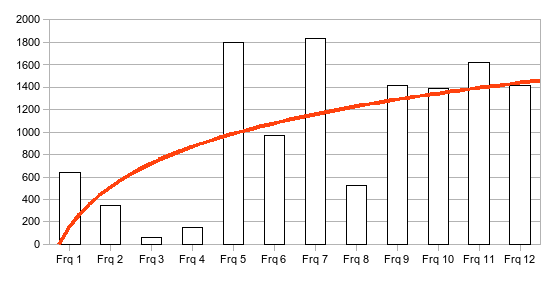
The next thing you will find, is the report builder in Base. From now on, it's very easy to create nice reports from your data tables in Base. Read more about the report builder here: http://wiki.services.openoffice.org/wiki/SUN_Report_Builder
A very small, but useful new feature is the ability to export a text document as MediaWiki text. If you are writing Wiki text from time to time, I think you will find this little feature very useful.
Extensions are now capable of creating additional settings in OpenOffice.org.
When ?
Well, the release is planned for medio September. Lets hope that the plans hold.
22 August 2007
Bored ? ...see gullFOSS
Sometimes when I get bored, I am taking a look at gullFOSS just to see whats up. For instance take a look at this post about Notes. I think this is great news. The post takes you further to this wiki page where you can see mockups and several other interesting things.
Have a look. It's not fun, but very very interesting.
21 August 2007
IBM Lotus Notes 8

I have already looked at two parts:
- composite applications
- productivity tools
And I am very happy that Lotus Notes now comes with productivity tools and support for ODF (open document format).
Some day I hope to be able to ask IBM a few questions:
- When can we expect Lotus Notes rich text to be native stored as ODF ?
- Is it possible to import ODF documents into a Notes rich text field ?
- Why wont IBM Lotus say, that productivity tools is actually a clone/fork of OpenOffice.org ?
Please see my blogpost here - When can expect IBM staff to use their own applications at work, e.g. product presentations and text documents ?
I'm tired of seeing IBM staff do presentations with an application like You-know-who Powerpoint. When are you ready to take your own medicine ?
02 August 2007
Still translating
We are still working on the Danish translation of OpenOffice.org 2.3. Right now we have 545 strings that needs translation or approval. The bad thing is, that a lot of these strings are still english text, that needs to be translated into Danish. This takes a lot of time.
However, I have just installed the latest snapshot on my computer, and it was nice to see some of the new screens with Danish text.
27 July 2007
Dear diary...
I have been on vacation for about two weeks now. One of my most interesting experiences has been not to be connected (to the Internet) for more than a week.
We are living in a small cottage on the west coast of Denmark, in the middle of no where and with my (disconnected) laptop.
What do I do ?
Well, I've been working on a piece in Danish about OpenOffice.org extensions. I printed a few articles and the complete Wiki before I left home. I hope it will be a good article, because we need to drag attention to this matter in Denmark. I don't think there is anybody (except from me) that has ever made an extension yet. I'm just writing to Paolo Mantovani about a bug in the BasicAddonBuilder.
I also prepared my speak at Barcelona. It's good to get away from everything. It makes you think better and it clears the mind. I'm looking forward to meet all the people at OOoConf. The guys and dolls that I have only met on email so far.
I'm playing with the kids (well, they are actually not kids anymore). We took s small drive to Lübeck, Germany this week. Nice, but rainy. Why does it always rain when I'm on vacation ?
04 July 2007
Symfoni integrates OpenOffice with Lotus Notes
I recently wrote about integration of OpenOff.org (ODF) in Lotus Notes. Now I have made a few screen shuts to give you an idea of how it works.
This is a good example that shows that ODF-integration is possible and we will probably see more examples in the futire.
In the coming weeks I'll try to make some screen shots of how the templates and field mapping works.
Here is a single image:
26 June 2007
Hangovers -sort of
Not literally, but after several months of struggles with the decision in the Parliament and writing the objections to ISO/IEC DIS 29500 (ECMA-376) hearing, I somehow find it nice just doing something else. I shipped the objections yesterday, witch is actually one week ahead. I'm proud to be ahead for once. I even had time to help one of the guys from Belgium with his objections. I got a lot of help during the process and it's nice to be able to pass it on to someone else.
I started to help translate OpenOffice.org 2.3 to Danish. We are already more than half way, so in a few days, I expect that to be finished as well. I'm happy that the translation is going smooth and without any problems. No discussions and arguing. Just translate the strings, one by one.
I'm looking forward to the summer holidays together with family and friends. Four weeks with no connection to the internet. Is that possible ? I'll bring some work, just in case I get bored, but my experience tells me that I won't be doing much of that. Unless of cause; if it rains. But I must prepare my speak in Barcelona. I'm really looking forward to OOoCon 2007. It will be nice to meet all the people I only know from e-mails and blog posts.
I hope to see the new eOffice from Symfoni Software before I go on vacation. I'm really excited about the Lotus Notes -> ODF integration.
The media is going on vacation too. I can see that more and more articles are just translations of stuff. Boring. I don't think I'll miss that part. The only exciting thing right now, is that all the papers is trying to analyze what will happen, now that the Parliament has finished their part. Will Microsoft keep the marked share ? Will OpenOffice.org finally get its break through ? How will the ISO election end ? and so on and so forth.
Well, we'll see about that later.
Subscribe to:
Posts (Atom)


 Del.icio.us


